| GINO Graphics Suite - GINOGRAF v9.5 |  |
 |
| GINO Graphics Suite - GINOGRAF v9.5 | |
|
There are four components available for the building of a fully annotated, filled Bar Chart:
| ggBlockFillBarChart() | Drawing block filled barchart |
| ggAddBarChartOutline() | Drawing bar outline |
| ggFillBarChart() | Drawing filled bars |
| ggAddBarChartValues() | Displaying start, finish or length values |
All four routines may be used independently of each other or on the same chart although it is usual to use a combination of block filling and values, or simple filling, outline and values. It is necessary to define both X and Y axis positions and data ranges before calling any of these routines either by the axis definition routines or the Complete Chart Drawing routine ggPlotBarChart(). One of the axes should be defined as a discrete axis (scale=GDISCRETE) where upon the bars are measured against the remaining non-discrete axis.
Users should note that if ggFillBarChart() is called after ggPlotBarChart() or ggAddBarChartOutline() the Bar Chart outline will be overwritten by the filling. If the outline is required, the solution is to always draw the outline with ggAddBarChartOutline() after the filling. The block filling routine fills the appropriate areas and follows this with drawing the bar chart outline in the current GINO line colour.
The routine to display a block filled bar chart is:
ggBlockFillBarChart(nbars,bars,frac,line)This routine displays a set of data values as block filled bars on the last defined set of axes. The bars are plotted about the centre of the tick marks along the discrete axis according to the current block chart attributes. Each bar starts at the corresponding value of bars.s and finishes at the corresponding value of bars.f. Start and finish values may be positive or negative.
All the bars are solid filled with the specified line style with the extrusions filled with a darker (or lighter) shade of this line style according to the current block chart attributes (using ggSetBlockChartAttribs()).
The following shows an example of a block filled bar chart.
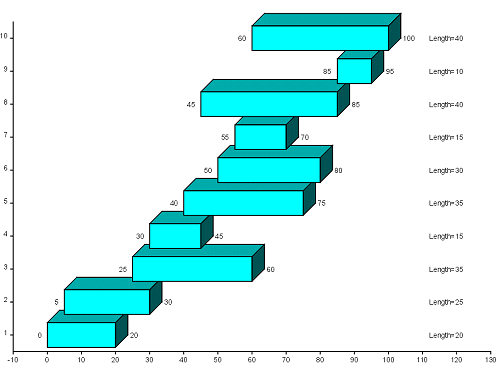 |
Block Filled Bar Chart |
The routine to display a set of bars is:
ggAddBarChartOutline(nbars,bars,frac)This routine displays a set of data values as bars on the last defined set of axes. The bars are plotted about the centre of the tick marks along the discrete axis in the order that they are presented within the array. Each bar starts at the corresponding value of bars.s and finishes at the corresponding value of bars.f. Start and finish values may be positive or negative.
The representation of the bar depends on the width of the bars which is determined using the parameter frac, the fraction of the widest possible bar given the axis length and number of bars. The effects of changing frac are the same as with the Histogram routine ggAddHistogramOutline().
The routine to display a set of filled bars is:
ggFillBarChart(nbars,bars,frac,fill,line)This routine displays a set of data values as filled bars on the last defined set of axes. The bars are plotted about the centre of the tick marks along the discrete axis in the order that they are presented within the array.
The width of the bars is determined using the parameter frac, the fraction of the widest possible bar given the axis length and number of bars.
The hatch or fill style for each bar is held in the array fill. Various hatches and cross hatches as well as solid fill are available. If an element of fill contains a number less than -1 (GHOLLOW), the corresponding bar is not filled and the boundary not drawn. The line styles used to fill the bars are held in the array line. The default line styles, hatch styles and fill styles appear in Appendix A of this manual (see Defaults). Further information on line style definition (which includes colour definition) and information on hatch and fill style definition appears in the main introduction.
The bar outlines are not drawn with this routine. Users should use ggPlotBarChart() or ggAddBarChartOutline() to draw the outline.
The routine to annotate a Bar Chart is:
ggAddBarChartValues(nbars,bars,frac,sfl)where ggAddBarChartValues() will display nbars values associated with the Bar Chart bars drawn by ggPlotBarChart(), ggFillBarChart() or ggAddBarChartOutline(). The argument sfl provides the choice of displaying start values (sfl=GSTART), finish values (sfl=GFINISH) or bar lengths (sfl=GLENGTH). By default, the values are positioned at the centre of the associated bar in the same numerical format as the current non-discrete axes. The numerical format of the data values can be changed through the routine ggSetAxesAnnotation() with xory set to whichever is the non-discrete axis.
The argument frac supplied to ggAddBarChartValues() is required to ensure correct positioning of the values when they are placed at the edge of each bar, it should therefore be set to the same value as that used in a corresponding call to ggPlotBarChart(), ggFillBarChart() or ggAddBarChartOutline().
Alternative positions and formatting options can be set by using the annotation control routines (see Histogram Components). The 15 control point positions around the Bar Chart areas are located in the same logical position irrespective of the data limits or the axis direction. These routines provide for string angle and justification control as well as prefix and/or suffix strings added to each value.
The following example shows the use of all the Bar Chart component routines:
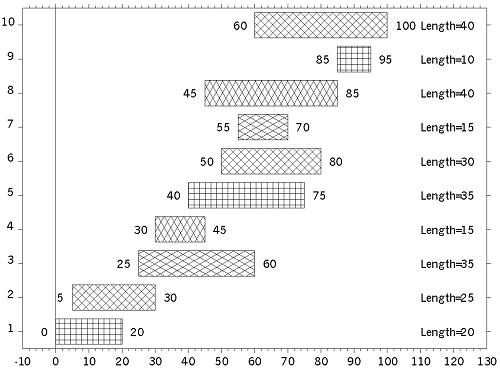 |
Fully annotated Bar Chart |
[C/C++]
/*  FULLY ANNOTATED BARCHART */
#include <gino-c.h>
#include <graf-c.h>

int main(void) {
   GBARCHART bars[10] = {0.0,20.0,5.0,30.0,25.0,60.0,
       30.0,45.0,40.0,75.0,50.0,80.0,55.0,70.0,45.0,85.0,
       85.0,95.0,60.0,100.0};
   GLIMIT lims;
   GCHASTY rep;
   int i, flg, line[10],
       fill[10] = {5,6,7,8,5,6,7,8,5,6};
   for (i=0; i<10; i++) line[i]=1;

   gOpenGino();
   xxxxx();
   ggSetGraphCharMode(GGINOMODE);

/* ENQUIRE GINOGRAF DRAWING LIMITS AND CHARACTER SIZE */
   ggEnqPlotFrame(&flg,&lims);
   gEnqCharAttribs(&rep);

/* SET UP AXES POSITIONS AND SCALES */
   ggSetAxesPos(GAXISSTART,9.0*rep.width,
       5.0*rep.height,lims.xmax-lims.xmin-12.0*rep.width,GXAXIS);
   ggSetAxesScaling(GLINEARTYPE1,12,-10.0,130.0,GXAXIS);
   ggSetAxesPos(GAXISSTART,9.0*rep.width,
       5.0*rep.height,lims.ymax-lims.ymin-10.0*rep.height,GYAXIS);
   ggSetAxesScaling(GDISCRETE,10,1.0,10.0,GYAXIS);

/* DRAW BAR CHART */
   ggFillBarChart(10,bars,0.75,fill,line);
   ggAddBarChartOutline(10,bars,0.75);
/* POSITION START VALUE LEFT OF BAR, RIGHT JUSTIFIED */
   ggSetValueAttribs(GOUTSIDELEFT,GCENTRE,0.0,
       0.0,0.0,0.0,GCENTRE,GRIGHT);
   ggAddBarChartValues(10,bars,0.75,GSTART);

/* POSITION FINISH VALUE RIGHT OF BAR, LEFT JUSTIFIED */
   ggSetValueAttribs(GOUTSIDERIGHT,GCENTRE,0.0,
       0.0,0.0,0.0,GCENTRE,GLEFT);
   ggAddBarChartValues(10,bars,0.75,GFINISH);

/* POSITION LENGTH VALUE AT 110.0 LEFT JUSTIFIED */
   ggSetValueAttribs(GSPECIFIED,GCENTRE,110.0,
       0.0,0.0,0.0,GCENTRE,GLEFT);
   ggSetValueTags("Length="," ");
   ggAddBarChartValues(10,bars,0.75,GLENGTH);

/* DRAW GRID */
   ggAddGrid(GINTERMEDIATE,GTICKS,GANNOTATION,GANNOTATION);

   gSuspendDevice();
   gCloseGino();
   return(0);
}
[F90]
! FULLY ANNOTATED BARCHART
use gino_f90
use graf_f90

  type (GBARCHART), dimension(10) :: bars = &
    (/GBARCHART(0.0,20.0),GBARCHART(5.0,30.0), &
      GBARCHART(25.0,60.0),GBARCHART(30.0,45.0), &
      GBARCHART(40.0,75.0),GBARCHART(50.0,80.0), &
      GBARCHART(55.0,70.0),GBARCHART(45.0,85.0), &
      GBARCHART(85.0,95.0),GBARCHART(60.0,100.0)/)
  type (GLIMIT) lims
  type (GCHASTY) rep
  integer i, flg
  integer, dimension(10) :: line = (/10*1/)
  integer, dimension(10) :: fill = (/5,6,7,8,5,6,7,8,5,6/)

  call gOpenGino
  call xxxxx
  call ggSetGraphCharMode(GGINOMODE)

! ENQUIRE GINOGRAF DRAWING LIMITS
! AND CHARACTER SIZE
  call ggEnqPlotFrame(flg,lims)
  call gEnqCharAttribs(rep)

! SET UP AXES POSITIONS AND SCALES
  call ggSetAxesPos(GAXISSTART,9.0*rep%width, &
       5.0*rep%height,lims%xmax-lims%xmin-12.0*rep%width,GXAXIS)
  call ggSetAxesScaling(GLINEARTYPE1,12,-10.0,130.0,GXAXIS)
  call ggSetAxesPos(GAXISSTART,9.0*rep%width, &
       5.0*rep%height,lims%ymax-lims%ymin-10.0*rep%height,GYAXIS)
  call ggSetAxesScaling(GDISCRETE,10,1.0,10.0,GYAXIS)

! DRAW BAR CHART
  call ggFillBarChart(10,bars,0.75,fill,line)
  call ggAddBarChartOutline(10,bars,0.75)

! POSITION START VALUE LEFT OF BAR, RIGHT JUSTIFIED
  call ggSetValueAttribs(GOUTSIDELEFT,GCENTRE,0.0, &
    0.0,0.0,0.0,GCENTRE,GRIGHT)
  call ggAddBarChartValues(10,bars,0.75,GSTART)

! POSITION FINISH VALUE RIGHT OF BAR, LEFT JUSTIFIED
  call ggSetValueAttribs(GOUTSIDERIGHT,GCENTRE,0.0, &
    0.0,0.0,0.0,GCENTRE,GLEFT)
  call ggAddBarChartValues(10,bars,0.75,GFINISH)

! POSITION LENGTH VALUE AT 110.0 LEFT JUSTIFIED
  call ggSetValueAttribs(GSPECIFIED,GCENTRE,110.0, &
    0.0,0.0,0.0,GCENTRE,GLEFT)
  call ggSetValueTags('Length=',' ')
  call ggAddBarChartValues(10,bars,0.75,GLENGTH)

! DRAW GRID
  call ggAddGrid(GINTERMEDIATE,GTICKS,GANNOTATION,GANNOTATION)

  call gSuspendDevice
  call gCloseGino
  stop
  end